From a collection to an app
Take what you built as a collection — a bookshelf, an attendance sheet, a sign-up desk — and make it an app you own as code. Its fields, screens and actions are copied into a spec, and its records can move into the new app too. The collection itself is not touched.
This is one of the “what to make” choices of the experimental Blueprints. Do the Blueprints setup first (Claude Code, a trusted work folder): see the Blueprints guide.
- When to use it
- Choosing a base
- Starting
- What is copied
- What the spec settles
- The steps
- How the records move
- Actions and ingests
- When the source changes after the copy
- What you end up with
- Troubleshooting
- See also
When to use it
A collection’s strength is that you can reshape it by talking to an agent. An app is easier when:
- other people should use it through fixed screens (family, a team, the public);
- sign-in and roles (admins and members, say) should decide who can do what;
- it should run on your own server or cloud (Firebase, Cloudflare, Supabase) and live in your hands as code.
The collection keeps working after you make the app. The two are not kept in sync (see when the source changes after the copy).
Choosing a base
The base is where the app runs. Start with local: it stays on your computer, costs nothing and needs no cloud setup.
| Base | The app | Records | Images and files | What you need (besides what everyone needs) |
|---|---|---|---|---|
| Local | Express + SQLite + Vue, on your computer | SQLite | data/files/ | nothing |
| Firebase | A Firebase web app, with a development and a production project | Firestore | Cloud Storage | a Google account, a billing account, the firebase CLI, gcloud, JDK 21 or later |
| Cloudflare | A Cloudflare Workers app | D1 | R2 | a Cloudflare account (free is fine); wrangler comes with the project |
| Supabase | A Vue app served by Cloudflare that talks to Supabase directly | Postgres | Supabase Storage | Docker Desktop (running), Supabase and Cloudflare accounts; the CLIs come with the project |
Everyone needs Node.js 22.13 or later, yarn, a signed-in Claude Code and git (Blueprints guide). On Firebase, firebase and gcloud must be signed in with the same Google account.
Starting
- Open Blueprints from the “More features” menu in the top bar (the
widgetsicon), and press New build. - Pick the base under Built on, and under What to make pick コレクションからアプリにする (from a collection).
- For the Project folder, give a folder inside a trusted parent (a name that does not exist yet is fine).
- Answer the questions and press Start.
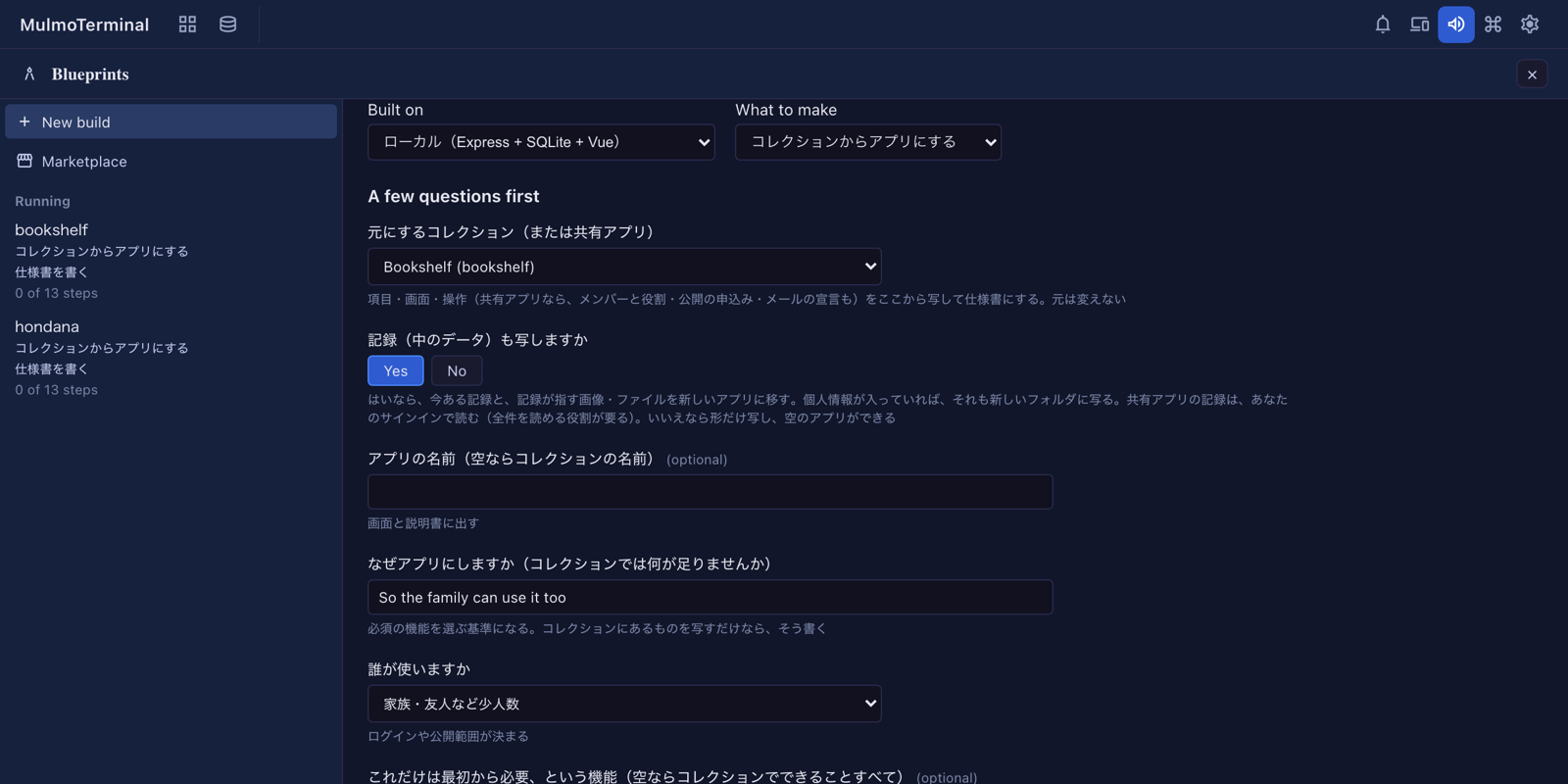
What the questions are for
The questions are in Japanese, as the pack writes them.
| Question | What it decides |
|---|---|
| 元にするコレクション(または共有アプリ) — the source | What to copy. Collections of the workspace and the saved folders are listed, and shared apps (folders with an app.json) |
| 記録(中のデータ)も写しますか — copy the records too? | Yes: the records and the images and files they point at move into the app. No: only the shape, giving an empty app. There is no default; you choose each time |
| アプリの名前 — the app’s name | Shown on screen and in the README. Empty means the collection’s name |
| なぜアプリにしますか — why an app? | The yardstick for the must-haves. “Just copy it” is a fine answer |
| 誰が使いますか — who uses it? | Decides sign-in and how public it is |
| これだけは最初から必要、という機能 — must-haves | Each is proven by a test at the end. Empty means everything the collection does |
| あとでよい機能 — later | Left out of the first version |
| ログインはどうしますか — sign-in | none / one shared password / an account per person |
| 役割は分けますか — roles | Admins and members, say. Asked only with an account per person |
| 扱う情報でいちばん気をつけるもの — the most sensitive data | Decides storage and how strict backups are |
| 画面の言葉 — the app’s language | Japanese, English, or both |
What is copied
When you press Start, the copy is taken once, into the new folder’s .blueprint/source/:
- the shape of the chosen collection and of every collection it links to through
ref, embeds, backlinks and rollups (schema.json,SKILL.md, the declared views and action templates). A linked collection that cannot be found is listed under the spec’s open questions; - with the records: each collection’s records (
records.jsonl) and the files their image and file fields point at; - for a shared app: its declaration (
app.json) and the shape of every collection; - what was copied and when (
source.json).
The copy may weigh 200 MB in all. Past that the start is refused before anything is written; start without the records (the shape alone almost always fits).
The check before personal data is copied
When the copy would carry what may be personal data, pressing Start stops once and lists what would be copied:
- with the records: every email field, and fields whose key or label names a person’s name, mail, phone, address, birth date or postal code (columns inside a table field included);
- for a shared app: the members’ email addresses. These travel with
app.json, so the check appears even without the records.
Check the list and press Checked: copy it and start. To leave the records out, answer No to copying the records and press Start again. Changing an answer takes the offer back, so you confirm what you actually send.
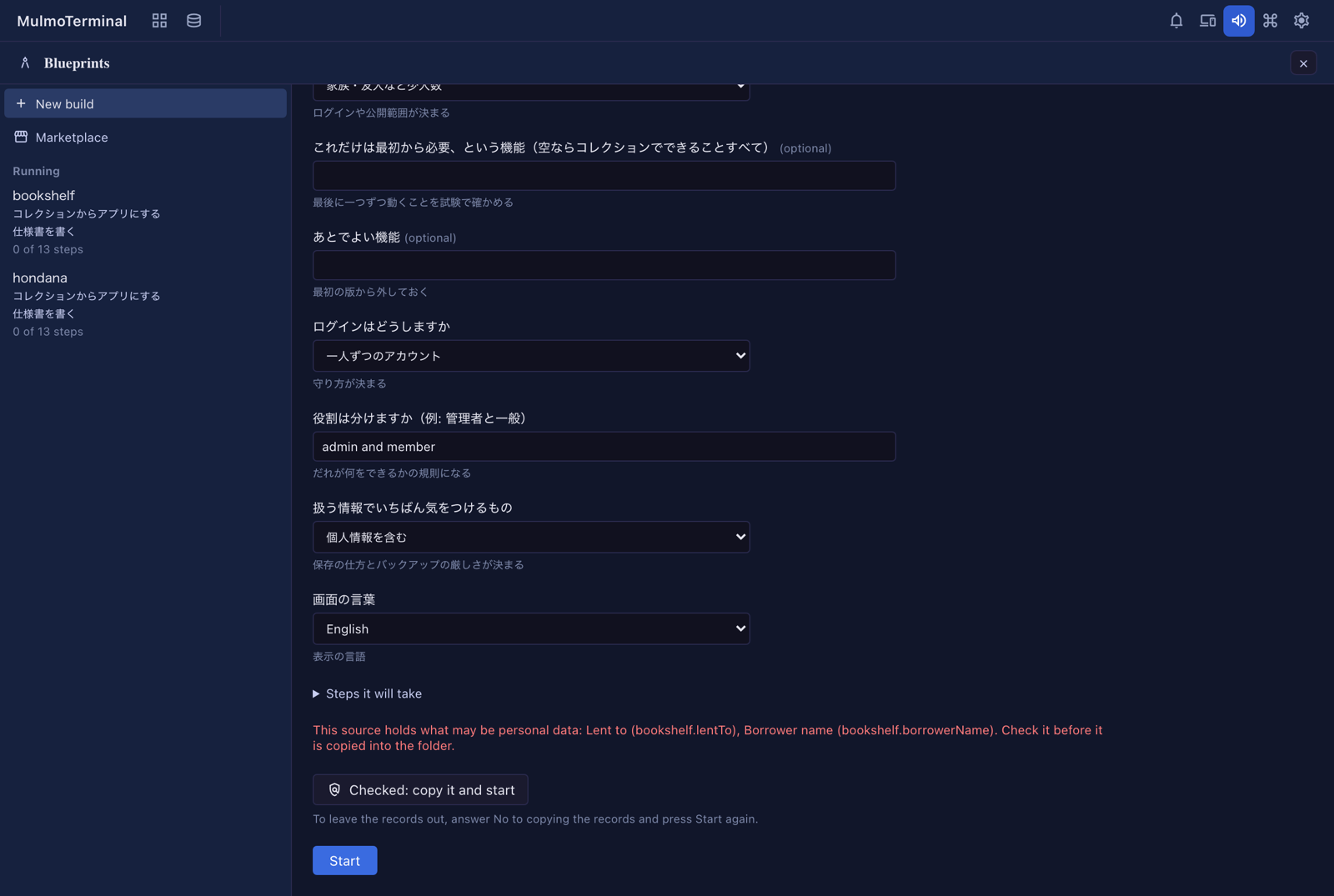
The detection leans wide: a field that is not personal may be listed, which costs one confirmation.
Starting from a shared app
- With the records, they are read from Firestore with your own sign-in. Connect to shared apps first.
- Your role must read every record (owner, editor or viewer). A role that reads only part of them would give a short copy, so the start is refused with the reason.
- The app’s declaration — members and roles, public submissions, who sees what, mail, aggregates — is carried into the spec’s who-can-do-what, every part of it, and enforced by the base: the server’s rules on local and Cloudflare, security rules on Firebase, row level security on Supabase.
What the spec settles
The first step, 仕様書を書く (write the spec), drafts the spec from the copy and waits for your approval. You can change it by talking to it before you approve.
- Every field, view, action and ingest of the source is listed under a name that says which collection it came from (
books.title,books.views.board,books.actions.tidy). If one is missing, the step does not pass. - Each action (something an agent was asked to do) and ingest gets a proposed treatment:
- Make it a feature: built into the app. An action that only changes values (
mutate) always is. - A person does it by hand: the README gets the procedure.
- Drop it: the spec says why.
- Make it a feature: built into the app. An action that only changes values (
- The table and column names the spec settles are what the record move is checked against.
How field types come out
| Collection type | Local and Cloudflare (SQLite / D1) | Firebase (Firestore) | Supabase (Postgres) |
|---|---|---|---|
| string / text / email / markdown | TEXT | string | text |
| number | REAL (INTEGER if whole numbers) | number | numeric (integer if whole numbers) |
| boolean | 0 / 1 | boolean | boolean |
| date / datetime | ISO 8601 TEXT | ISO 8601 string | date / timestamptz |
| enum | TEXT with a value constraint | string | text |
| ref | a foreign key | the referenced document’s ID | a foreign key |
| image / file | a path in data/files/ (R2 on Cloudflare) | a path in Cloud Storage | a path in Storage |
| table | a child table | an array in the document | a child table |
| derived / rollup / backlinks / embed / toggle / flag | not stored; computed for display | same | same |
The steps
Each base runs these steps in order. A step marked (approve) waits for you to approve it on screen. On screen the step titles are in Japanese, as the packs write them; they are translated here.
| Local | Firebase | Cloudflare | Supabase | |
|---|---|---|---|---|
| 1 | Write the spec | Write the spec | Write the spec | Write the spec |
| 2 | Check the tools (approve) | Tools and sign-in (approve) | Check the tools (approve) | Check the tools (approve) |
| 3 | App skeleton | Development and production projects (approve) | App skeleton | App skeleton |
| 4 | Data shape | App skeleton | Data shape | Data and permissions |
| 5 | Move the records | Sign-in | Move the records | Move the records |
| 6 | API | Data shape and security rules | API | Screens |
| 7 | Screens | Move the records (emulators) | Screens | Sign-in |
| 8 | Sign-in | Features and screens | Sign-in | Start it and check |
| 9 | Start it and check | Prove the must-haves by tests | Start it and check | Prove the must-haves by tests |
| 10 | Prove the must-haves by tests | Make the actions features | Prove the must-haves by tests | Make the actions features |
| 11 | Make the actions features | Publish for development | Make the actions features | Security check |
| 12 | Security check | App Check and a budget alert (approve) | Security check | Publish to Supabase and Cloudflare (approve) |
| 13 | How to use it, and backups | Security check | Publish to Cloudflare (approve) | Move the records to production (approve) |
| 14 | Publish to production (approve) | Move the records to production (approve) | How to use it, and handover | |
| 15 | Move the records to production (approve) | How to use it, and handover |
In each step an agent works, then a machine check runs (tests, a build, reading the data back). If it fails, the agent fixes it and the check runs again.
How the records move
With records copied, the 記録を移す (move the records) step builds the import (yarn import-source). A build that copied the shape only does nothing there.
- The result is checked against the source by machine. Every record and every stored field has to be in the agreed table with its original value, and every image and file in place with the same bytes.
- Running it again gives the same result (rows are overwritten by primary key, never duplicated). The check runs it twice to make sure.
- By base:
- Local: into SQLite and
data/files/. - Firebase: first into the emulators. Production comes after 本番に公開 (publish to production), with one more approval. It writes with your Google account (
gcloud auth application-default login) and reads production back to compare. - Cloudflare: first into
wrangler’s local state, so the appyarn startopens has the records too. Production comes after publishing to Cloudflare, with one more approval, throughyarn import-source --remote, with the account you signed in withyarn wrangler login. - Supabase: first into the local Supabase stack (in Docker). Production comes after publishing, with one more approval, through
yarn import-source --linked --owner <email>, naming the address you registered in the published app. Imported records belong to your own account by default. It writes with the account you used foryarn supabase loginandlink; no secret key is used.
- Local: into SQLite and
Actions and ingests
What the spec made a feature is built in the アクションを機能にする (make the actions features) step, each with a test.
-
A step that needs AI (summarising, classifying, drafting) becomes a feature that calls the Claude API from the server, never from the browser. Where the key goes depends on the base:
Base Local Production Local .env— Firebase a secret ( firebase functions:secrets:set)same Cloudflare .dev.varswrangler secret putSupabase supabase/functions/.envsupabase secrets setThe agent never writes the key’s value; the README says where you put yours. The check fails if the key file is not in
.gitignore. - An ingest (RSS, Atom, JSON) becomes a job that runs on its schedule.
- When a must-have needs an action, the must-haves step builds it first, and the actions step does not build it twice.
When the source changes after the copy
The copy is taken once, at the start, and the build keeps working from it. If the collection or shared app changes afterwards, opening the build says so in one line.
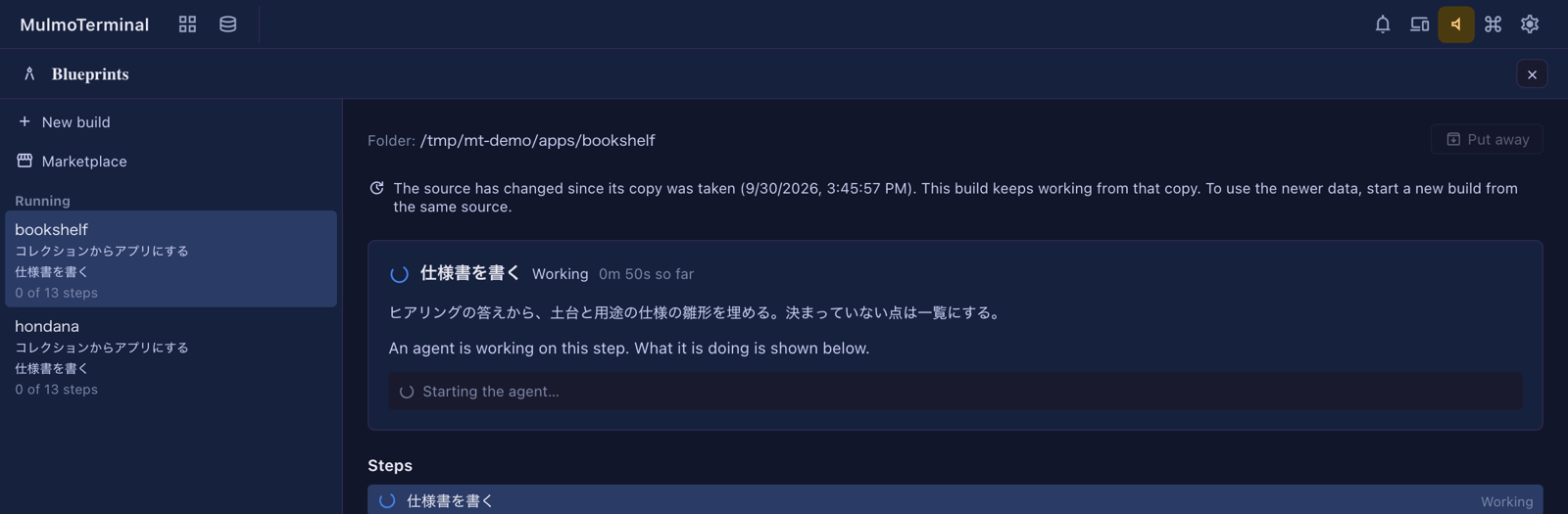
- It is checked once each time you open the build, not continuously (a shared app’s records are read from Firestore again).
- To use the newer data, start a new build from the same source. The copy of a running build is never replaced, because its spec was written from it.
- When the source cannot be read again (it is gone, or you signed out of the shared apps), nothing is shown.
What you end up with
- An ordinary project in the folder (
package.json, sources, tests);yarn startruns it. README.md: how to use it, the steps for actions a person does by hand, where the keys go.- The last step writes how to use it and how to back it up (local), or how to hand it over (cloud).
.blueprint/keeps the spec, the copy, and the record of the steps.
If you want git, run git init after the build: making the folder a repository midway drops its trust and stops the steps.
Troubleshooting
| Symptom | Cause and fix |
|---|---|
| Refused as not trusted | Claude Code does not trust the folder. Press “Open Claude Code here” under the message and answer, then Start again (Blueprints guide) |
| Refused with the copy’s size and the 200 MB limit | Too many records and images. Start without the records (the shape only) |
| A shared app refused for want of a sign-in | Copying records needs your sign-in. Connect to shared apps first |
| A shared app refused because your role reads only part of the records | Ask an owner for owner, editor or viewer, or start without the records |
| Firebase stops at tools and sign-in | firebase and gcloud are signed in with different accounts, or JDK 21 is missing. Fix it with the command shown, then Try again |
| Supabase says Docker is not running | Start Docker Desktop, then Try again |
| Supabase’s local stack does not start | Another project’s local Supabase stack on the same ports is named in the message. Stop it with yarn supabase stop --project-id <name>, then Try again |
| The record move’s check fails | The check’s output says which field of which record differs, and the agent fixes it. If it keeps failing, please report it |