6.6.0 — A tidier cell header, and document blueprints
A snapshot as of 6.6.0 (released 2026-09-28). It will go stale as the app moves on — that is expected, and the living reference is the guide each section links to.
Most of this release is the header of a cell, reorganised so that a tiled cell carries fewer icons and each one says what it is. Nothing needs configuring to get it; the one config change to know about is at the end of the first section.
The cell header: History and Tools
Row 1 of a cell now ends History · Tools · set aside · expand/restore · close. The five look-alike pane buttons are gone; each menu lists its views with an icon, a name and one line.
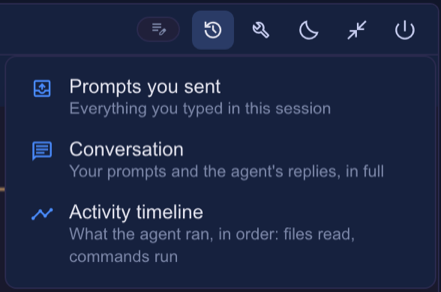
- History — Prompts you sent, Conversation, and the Activity timeline (Claude cells; it moved here from row 2).
- Tools — Tools used, Canvas (listed but disabled, with the fix, where the directory has no render MCP), Collections (only where the directory has them), and below a divider Restart the agent (same conversation, new process).
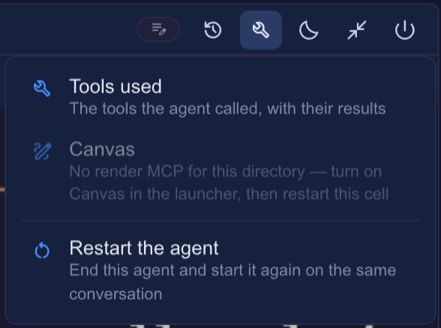
- The panes open beside an enlarged cell. On a tile the menus still show, with only the timeline and Restart pickable; the panes say “Enlarge the cell to open this beside it”.
- An open pane shows as a pressed menu icon and a checked entry; choosing it again hides the pane.
- Expand / restore moved to the right end, next to close. The + that sat beside close is gone — start terminals from the toolbar’s + (or
terminal-new-here).
If you added a restart button yourself (run: "action", action: "restart"), it now duplicates the Tools menu’s entry. Remove it from buttons if you like; it keeps working if you leave it.
Living guide: Reading a cell, Icons and tooltips.
The path menu, on every cell
Click the directory path on a cell’s header for everything to do with that place. It is on agent, Run command and launcher cells alike (a Run command has no prompt, so no Insert a file path).
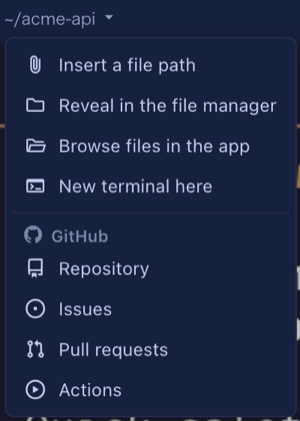
- Insert a file path leads (it used to be the paperclip on row 2); the four file items follow the UI language.
- The repository section is headed by where the repository lives: GitHub (Repository / Issues / Pull requests / Actions) or GitLab (Repository / Issues / Merge requests / Pipelines — for gitlab.com and any host in
gitlabHosts). - The Files button on row 1 is gone; Browse files in the app opens the same pane.
Living guide: The path menu.
Header buttons: folders and GitHub icons
Row 2 is yours to configure, and two things are new. A folder groups buttons under one icon (one level only), and an icon can name one of GitHub’s own shapes with github:<name> — repo, issue-opened, git-pull-request, play, mark-github.
{
  "buttons": [
    { "id": "pr", "icon": "github:git-pull-request", "label": "Open this branch's PR", "run": "open", "when": "isGitRepo", "open": { "pr": true } },
    { "id": "ops", "icon": "construction", "label": "Operations", "items": [
      { "id": "test", "icon": "science", "label": "Run the tests", "run": "shell", "cmd": "yarn test" },
      { "id": "compact", "icon": "compress", "label": "Compact this conversation", "run": "input", "text": "/compact" }
    ] }
  ]
}
Put it in ~/.mulmoterminal/config.json (every terminal) or a project’s .mulmoterminal.json, and restart MulmoTerminal. The default row 2 is now just Open this branch’s PR (shown when the branch has one) — Insert a file path moved to the path menu.
Living guide: Group buttons into a folder, Icons and tooltips, Customizing the header.
Toolbar
- Rooms, Blueprints and Worklog are behind one menu (the widgets icon), each with a line saying what it is. Entries for something not set up (no room yet, the worklog off) are left out.
- Pull requests shows GitHub’s mark, and appears only once a repository is configured.
- The grid ordering button opens a menu of Auto / Manual / Priority with the current one checked, instead of cycling on each click.
- Accounting moved onto the Collections screen.
- Every icon’s tooltip shows at once on hover, not after the browser’s delay.
Living guide: Configuration.
The cockpit roster and the filmstrip
- In manual order, drag a roster row by its header — the separate drag handle is gone. The row’s ⋮ still has Move up / down for the keyboard.
- A filmstrip thumbnail (the strip under an enlarged cell) now has the same ⋮: mark unread / read, move left / right, set aside, close.
- Closing from the ⋮ or the keyboard asks keep / remove for a worktree cell, as the cell’s own close does.
- New keymap action
mark-unread: the ⋮’s Mark unread / read from the keyboard. It is unbound until you bind it.
Living guide: Zooming into one, Keyboard shortcuts.
Blueprints: documents, not only apps
Choose the base 文書のフォルダ (a folder of documents) and a blueprint works on writing, checked by chaff (fetched on its own; nothing to install). New kinds: style (take a house style from model texts), write, polish, review (a contract’s missing references and contradictions, quoted), verify (an itinerary’s weekdays, order and totals, checked by machine) and ask (answers with where in the document they are written).
- 「例から始める」 has document examples with sample documents placed in the folder, so you can try them without documents of your own.
- A finished build shows its report in the run view, and lists the files it changed — each opens in the Files view with one click.
- Refusals and the executor’s own step notes are shown in your language.
- Builds that share a folder each keep their own answers, and two never run there at once.
- A folder inside a git worktree is trusted through its main repository, as Claude Code does.
Living guide: Blueprints (see “What we would like you to try”).
Node.js too old
npx mulmoterminal on Node older than 22.12 now stops at once with a banner and the upgrade steps, instead of starting a server that died with bad option.
Living guide: Getting started.