7.2.0 — Change settings in Settings instead of asking the agent
A snapshot as of 7.2.0 (released 2026-09-30). It will go stale as the app moves on — that is expected, and the living reference is the guide each section links to.
Nothing needs configuring. Everything below is either on screen already or a control in Settings (the gear at the top right). Settings that used to need a conversation with an agent — the header, the models, your keys, your own theme — now have a control of their own. The skills are still there for what a form cannot do, such as designing a theme from a photo.
New features
The header: buttons, chips and status colours
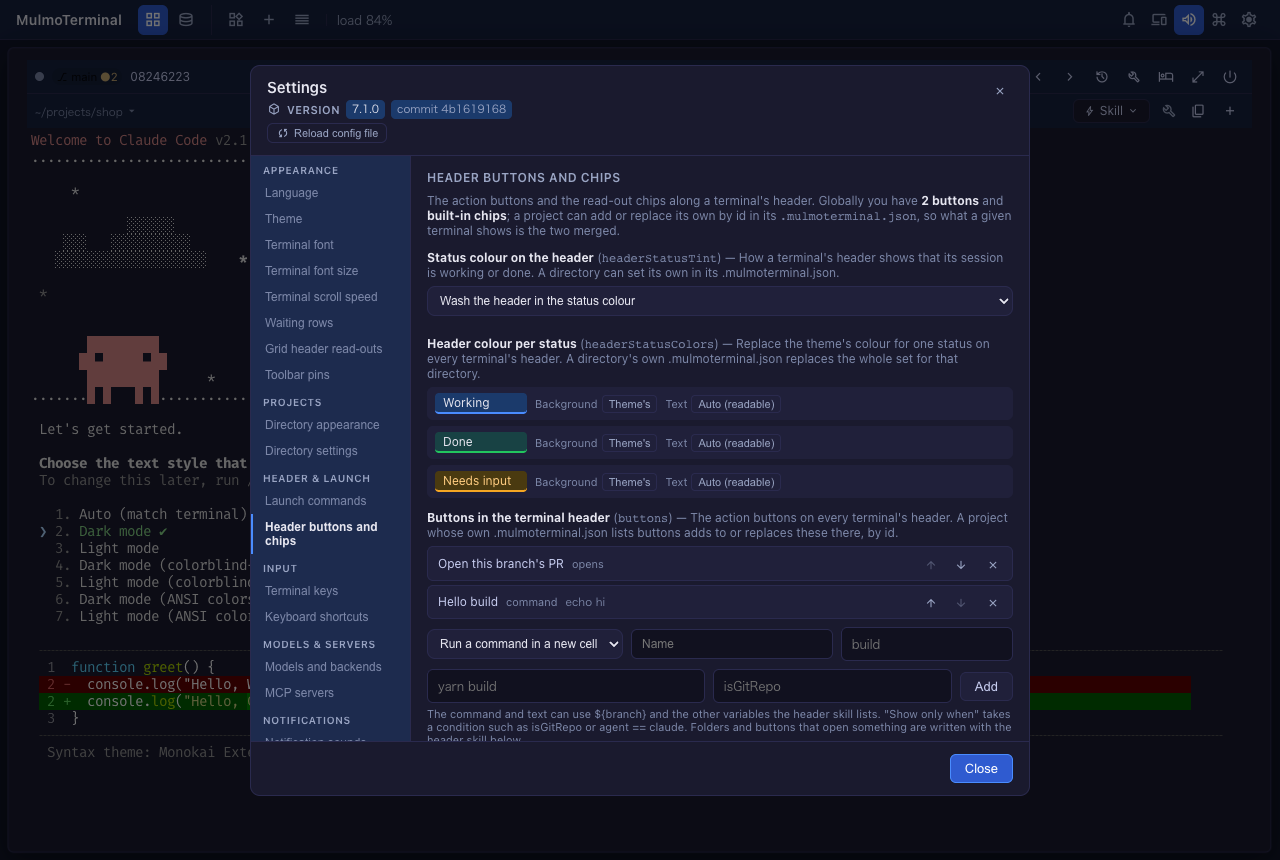
Settings → Header buttons and chips now changes, for every terminal:
- Buttons (#2680) — add one that runs a command in a new cell or types text into the agent (
/compact), with an optional icon and a condition such asisGitRepo. The arrows move a button and the cross removes it. Back to the built-in button puts the PR button back. Folders and buttons that open something are still written as before (the header guide). - Chips (#2672) — add a built-in read-out (branch, context left, tokens, …) or text of your own, remove one, move one, or go back to the default set.
- Header colour per status (#2640) — a background and a text colour for working, done and needs input, with a sample header beside each. Status colour on the header (#2632) chooses how the status shows at all.
The open terminals change as soon as you press a button — no reload.
Your own theme
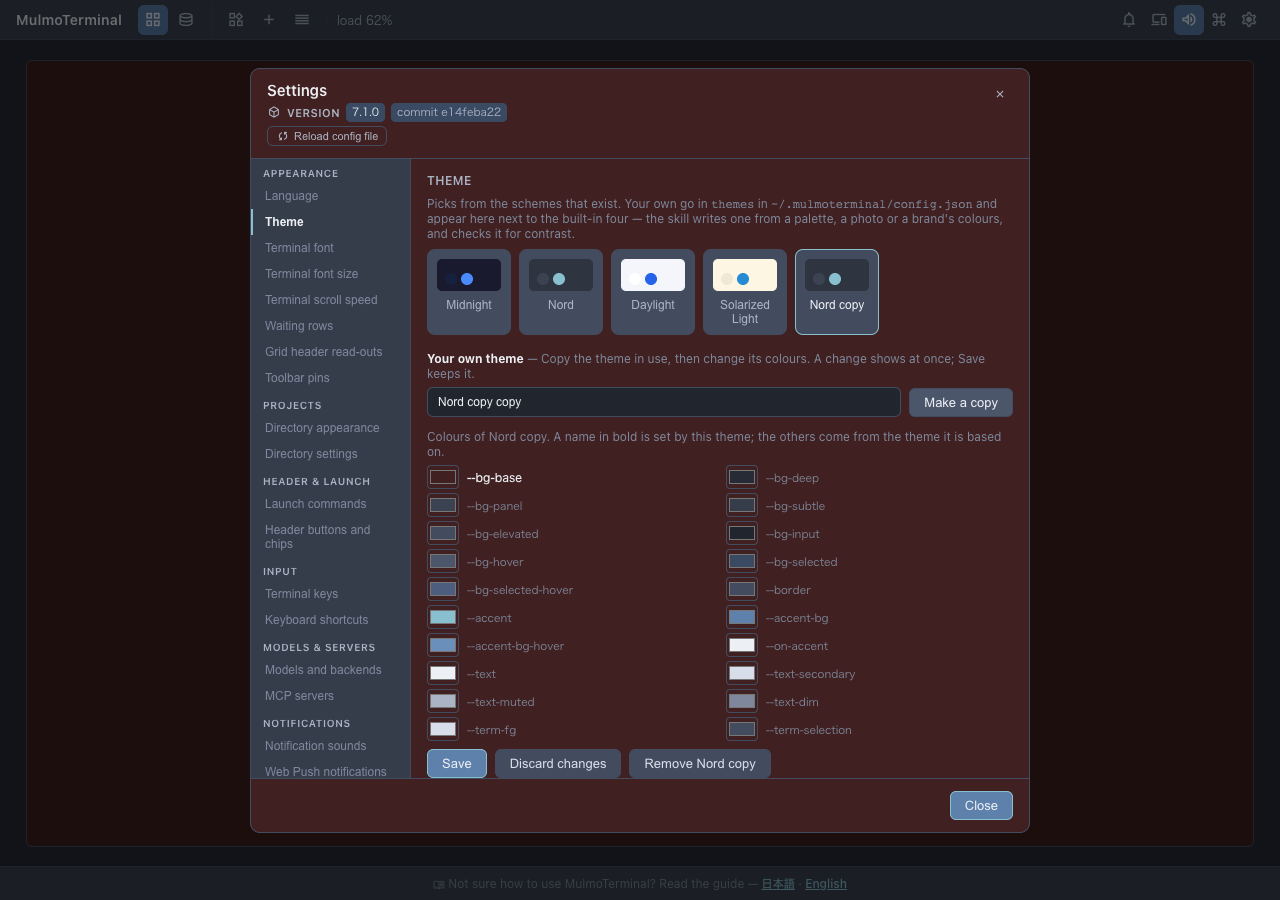
Settings → Theme → Your own theme (#2673): pick the theme closest to what you want, press Make a copy, then change any colour with the picker next to it. The whole app repaints as you choose, so you judge it on the real screen. Save keeps it; closing Settings without saving puts the saved colours back; Remove deletes the copy. The theme skill is still the way to design one from a mood or a picture (custom themes).
Models, agents and accounts
In Settings → Models and backends:
- Default agent (#2632) — what a new terminal starts, from a list.
- Custom agents and accounts (#2649) — add one with a name and a command (or a config directory), remove one with its cross.
- Backends (#2665) — add OpenRouter, a company gateway or a local model with its URL, the name of the environment variable holding the key, and the model ids. The form refuses a URL ending in
/v1and a pasted key, the two mistakes that break a session silently (backends).
The Agent Picker follows at once. Playful effects is now an on/off switch under Theme.
Keyboard shortcuts by pressing them
Settings → Keyboard shortcuts (#2668): press Change on an action, then the keys you want. Clear unbinds it. A key that cannot be written in a binding (the space bar, a numpad key, +), or one that would clash with another binding, is refused with the reason. Recommended keys (#2642) lists a starter set for your platform and adds it with one button (keymap).
A directory’s own settings, in the Files pane
- Settings → Directory settings (#2676): expand a directory and press Open in Files beside its
.mulmoterminal.json. Where it has none, Create .mulmoterminal.json and open it writes an empty{}first. - The editor knows the file (#2670): it offers the keys as you type (
Ctrl+Space) and underlines a value the server would reject. - Save applies it at once (#2659), and a note under the editor says whether the file is JSON and which keys did not take (per-project settings).
Reload config.json without a restart
The Reload config file button under the version at the top of Settings (#2663) reads ~/.mulmoterminal/config.json again after you or an agent edited it by hand. A file that does not parse, or a keymap that would stop the server, is refused with the reason and the running settings stay.
More in the Files pane
- New file, New folder, Rename, Move to Trash in the tree’s row menu (right-click) (#2637). On macOS, drag a trashed item back out of the Trash; Finder’s Put Back does not know where it came from (#2646).
- Editor and Preview side by side for Markdown — the split icon next to Preview. The Preview follows the heading you are editing under (#2629).
- Code blocks in the Preview are coloured (#2613) and have a copy button that shows the file’s own text before copying it (#2664).
One name for every operation
Each thing you can do to a terminal — open its Files pane, its prompts, its transcript, its tools, copy its last code block, insert a path, reveal the folder, dictate, show its diff, write a note, park it, … — now has one name that works three ways: as a header button ("run": "action"), as a keyboard shortcut in keymap, and as a row in the command palette (#2614, #2636, #2656). The toolbar’s screens and switches (#2648) and the grid’s page tabs (#2660) have names too (header actions).
The server on another machine (experimental)
Run MulmoTerminal on a Linux box or a VPS and use it from your laptop’s browser through an SSH tunnel (#2671). Started inside an SSH login, it prints the ssh -L … command to run on your own machine. "remoteServer": true in that server’s config (#2675) hides what would act on the server’s screen (file dialogs, “reveal”) and always uploads a dropped file. Setup: remote server.
Blueprints
- A Supabase base: data and sign-in in Supabase, the screen served from Cloudflare (#2589), and building from a collection on it (#2679).
- A finished build can be put away from the list and brought back; nothing is deleted (#2628).
- Polish asks what kind of document it is and measures it as that (#2652), reads it for what that kind needs — a conclusion first in a report, who and by when on a request (#2685) — and two new examples under “Start from an example” show it on a report and a blog post (#2688).
Stop one server of several
With two MulmoTerminal servers running, mulmoterminal stop --port 3002 stops only the one on that port (#2684); plain mulmoterminal stop still stops them all.
What looks different
- A What’s new dialog opens once after an upgrade with this page (and any versions you skipped), in Japanese or English (#2661).
- A + on each terminal’s second header row opens the launch panel on that terminal’s directory (#2630).
- The Settings sections above have gained controls; their skill buttons are still at the bottom.
- The blueprint agent writes to you in the language of your screen (#2638), and quotes English headings in English (#2633).
Under the hood
Nothing to do for any of these.
- Changing the work log, feed refresh or calendar sync switches, or how often idle sessions are swept, takes effect without a restart (#2645, #2666).
- Lists in the config are changed one entry at a time against the file, so a change made in another tab or by an agent since Settings opened is kept, not overwritten.
- A config write no longer drops a
keymapentry a newer version added (#2657). - The
files-*shortcuts and the palette’s/and#now work on the full-screen Files view (#2662). - A Files write aimed at a folder that no longer exists is refused instead of landing in the workspace (#2676).
- Blueprints: polish can end when there is nothing to polish (#2667), the document packs use chaffjs 0.15 (#2644), and a page-render check no longer fails on its own clean-up (#2572).
- The Preview’s copy buttons follow a change of the app’s language without reopening the file (#2682).
- Internal: a type rename in the Preview code-block dialog (#2678), and a test that left a process running (#2658).