5.0.0 — Read the conversation, not the screen
A snapshot as of 5.0.0 (released 2026-09-18). It will go stale as the app moves on — that is expected, and the living reference is the guide each section links to.
Nothing to configure. There is a button, and it is there as soon as you upgrade:
npx mulmoterminal@latest
Nothing breaks, either. The major number marks what this release is for, not a change you have to act on: no config key changed meaning, no path moved, and nothing you had set up stops working.
The feature
A Claude cell runs on the terminal’s alternate screen, which keeps no scrollback. So the conversation above the fold was not scrolled off — it was gone, and the only way back to what an agent said an hour ago was to ask it again.
Enlarge a cell and press the speech-bubble button in its header. The terminal steps aside and the session’s own conversation takes its place.
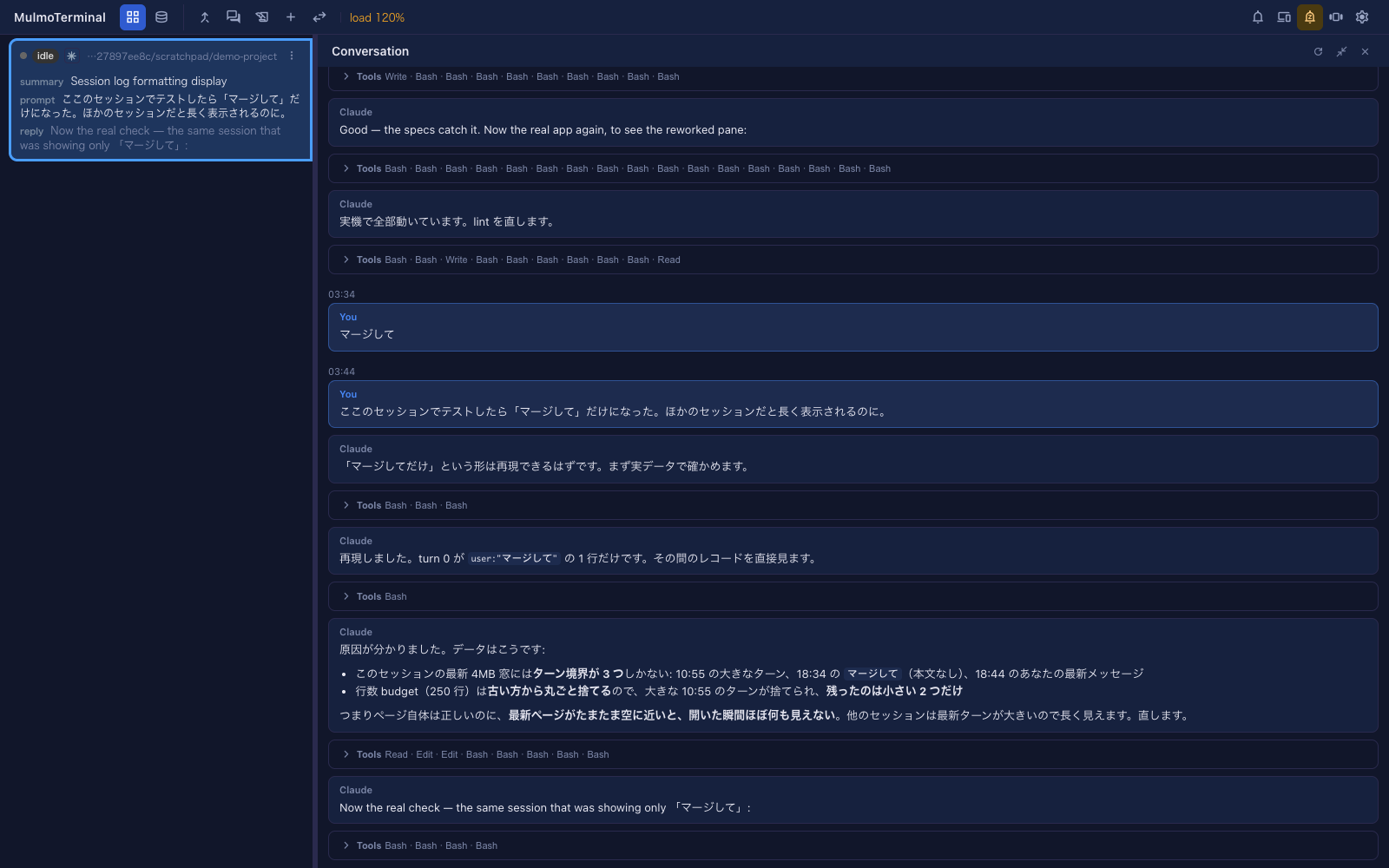
It is not a screen capture. It reads the agent’s own transcript, so there is no ANSI debris, nothing is lost to a redraw, and a turn begins where the agent recorded it beginning rather than where a line happened to wrap.
A frame per speaker. What you asked sits in one, what the agent answered in another, each named. A turn changes hands several times — you ask, it answers, it runs three things, it answers again — and the frames follow that rather than listing rows.
The reply is rendered. Headings, lists, tables and fenced code are drawn as the document the agent wrote, not as the characters it is made of. What you typed is left exactly as you typed it: a line that starts with # is a line that starts with #, not a heading.
The tool traffic is folded away. A turn’s Bash, Read and Edit calls are most of its bulk and almost none of what you came back to read, so each run of them collapses to one line saying what ran — Bash · Read · Edit. Click it when you want the output.
Scrolling back
Scroll up and it keeps going, a page at a time, to the session’s first turn. Your place is kept as pages arrive above you; the pane does not jump.
When it opens, it also fills the screen before handing it to you: a session whose newest turns are small — a one-word instruction, a prompt that was queued and never answered — would otherwise open on those alone, with the substantial turn just above the fold. Scrolling is for going further back, not for finding the conversation.
Two things it deliberately does not do:
- It does not follow a running turn. It is a snapshot of the moment you opened it. The terminal beside it is the live view, and a pane that moved while you were reading the part you scrolled back to find would be worse at its one job. The reload button in its header fetches the newest turns again.
- It does not cross into other sessions. One session, back to its first turn. Another session’s conversation is opened from that session.
Which agents it can read
| Agent | Conversation pane |
|---|---|
| Claude | yes |
| Codex | yes |
| Cursor | yes — the tool results are missing, because cursor writes none |
| Copilot | yes — no tool rows at all, because copilot records none |
| Grok · Muse · Antigravity | not yet |
An agent in the last row does not fail silently: the pane says its conversation lives somewhere no reader here can read yet. A shell cell has no conversation and never will, so it simply has no pane worth opening.
A conversation you ended with /clear says so too, rather than showing you the one you ended.
The living reference is Features.
How to tell you have it
Enlarge a cell. If its header has a speech-bubble button between the outbox and the merge arrows, you have 5.0.0.
Also in this release
Nothing here needs anything from you.
- A link in a reply opens in a new tab. Clicking one used to navigate the whole app away — taking every live terminal, open pane and unsaved editor buffer with it, with no way back.
- A remote image in a reply is not fetched. An
<img>fetches the moment it is on screen, so a reply carrying one told that host who opened the pane and when — and replies are written by agents that read the web and other people’s repositories. The URL becomes a link instead, which fetches when you decide to open it. Images that stay on this machine are still drawn. - A failed page says so. When a read fails while scrolling back, the pane says it could not read the turns before this one, rather than telling you that you have reached the beginning.