4.21.0 — Your OS opens the files this app cannot, and a spreadsheet no longer breaks when you click it
A snapshot as of 4.21.0 (released 2026-09-12). It will go stale as the app moves on — that is expected, and the living reference is the guide each section links to.
npx mulmoterminal@latest
Two things here need your hands, and the first one is about damage that may already have happened. Everything else is new and optional, or a fix that just works once you are on this version.
First: did the Files pane break one of your files?
Until this release, clicking a non-text file in the Files pane — a .xlsx, a .png, a .zip, a PDF — loaded it into the text editor as UTF-8. Every byte that is not valid UTF-8 became the replacement character U+FFFD on the way in, so the editor held a broken copy before you typed anything, and pressing Save wrote that copy over your file.
The damage happened on read. That is why it was silent: nothing looked wrong until the file would not open in Excel any more.
How to tell
The file usually gets much smaller. A real case: a 4.9 MB .xlsx came out at 336 bytes and no longer opened as a zip archive.
- In a git repository,
git statusshows it modified andgit diff --statshows the size collapse.git checkout -- <file>restores it. - Outside git, compare it against wherever it came from — a download, a share, a colleague. Your OS backup (Time Machine, File History) has the old copy if the change is recent.
What will NOT restore it
MulmoTerminal’s own editor backups cannot help here, and it is worth knowing why: the backup was also taken as UTF-8 text, from the same damaged string. The safety net stored the damaged version too. From this release the backup is skipped entirely for such a file, so the store can no longer fill up with broken copies — but a backup taken before the upgrade is not a copy of your spreadsheet.
What happens now instead
The pane says this file cannot be edited as text and offers a button — Open in OS — which hands the file to whatever application your system opens it with. Save is refused for such a file from every direction, including Ctrl/Cmd+S and the server’s own write route.
Reference: Editing files beside a terminal.
Second: .shape files with two statements on one line
ShapeScript continues to move toward the upstream app. This release makes two statements on one line a parse error, because the upstream app reads a property’s arguments to the end of the line:
sphere { position 0 1 0 size 2 } # was accepted, now a parse error
sphere {
position 0 1 0
size 2
}
The error names the rule, so you will not have to guess. Also gone: tau — write 2 * pi.
If you converted models for 4.20.0, this is the same job, much smaller: it only touches scripts written on one line. A model that already reads one statement per line needs nothing.
In exchange, text "Hello" now draws real glyph outlines — fill and extrude turn them into letters with their counters, and a text is a value with .bounds. A USDZ export of coloured polygon meshes no longer comes out white or misplaced.
New: hand a file to your OS from the tree
Right-click any row in the Files pane. A file offers Show in folder; a directory offers Open this folder.
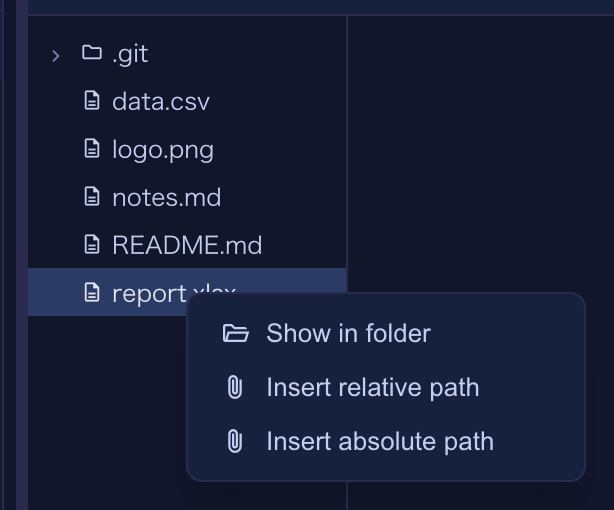
What you get is your own file manager, with the file selected rather than the folder merely opened:
| Your system | What runs |
|---|---|
| macOS | open -R — Finder opens the folder with the file highlighted |
| Windows | explorer /select, — Explorer, file highlighted |
| Linux / WSL | the parent directory through xdg-open and friends — none of them have a reveal verb |
The last row is not a bug and not a fallback we forgot to finish: no xdg-open-family opener can select a file. Opening the folder is the whole of what that platform offers.
Reference: Editing files beside a terminal.
New: a file the browser cannot show opens in its own application
Clicking a .docx in the tree, or a file path in the terminal, used to download it. Now it opens in the application your system uses for it — and the same rule decides for the terminal link, the tree and the raw URL, so the three cannot disagree about one file.
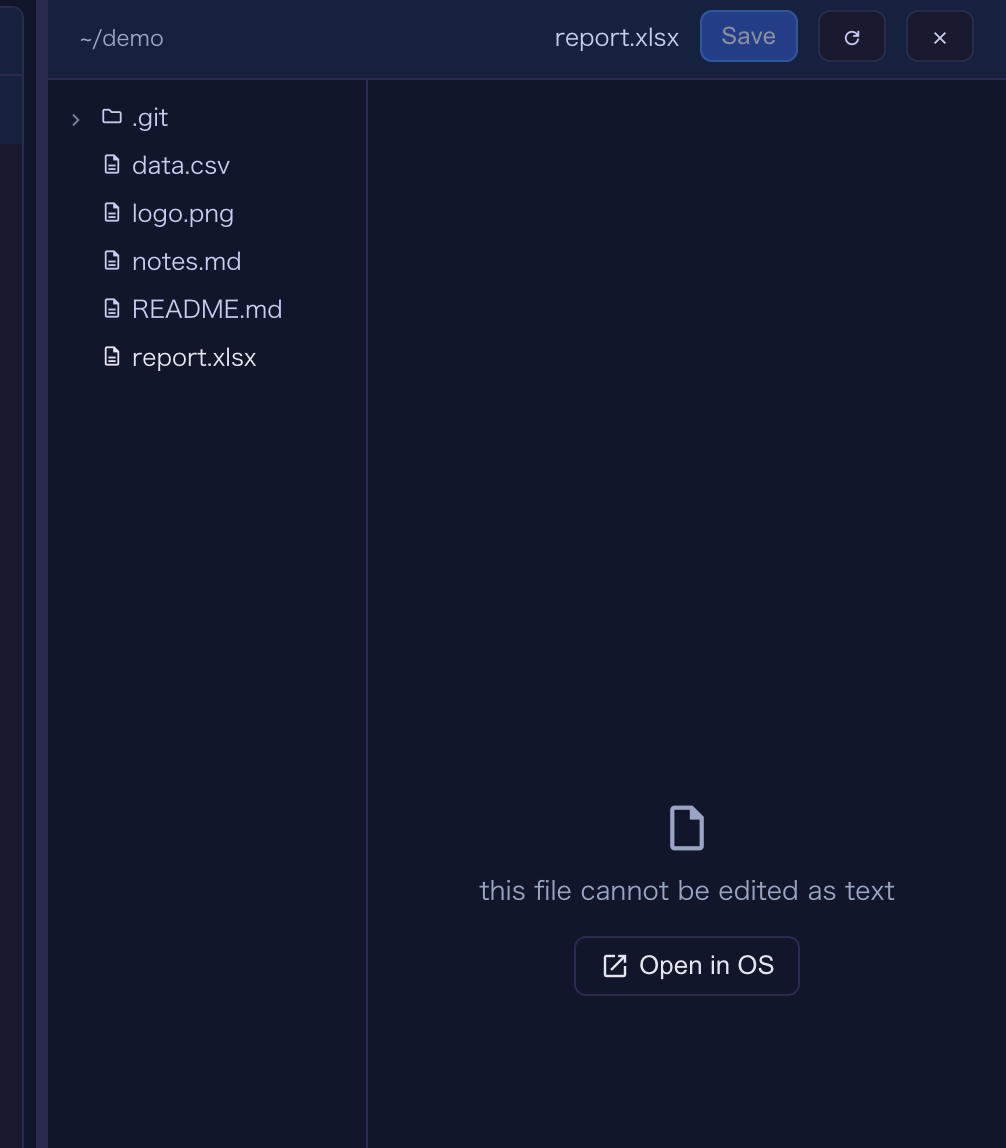
Text, Markdown, images, PDFs and the other things a browser can render still open in the app, as before. Nothing you were reading in a tab moves to a desktop application.
New: Actions in the path menu
The path menu’s GitHub section gained Actions, next to Repository, Issues and Pull requests:
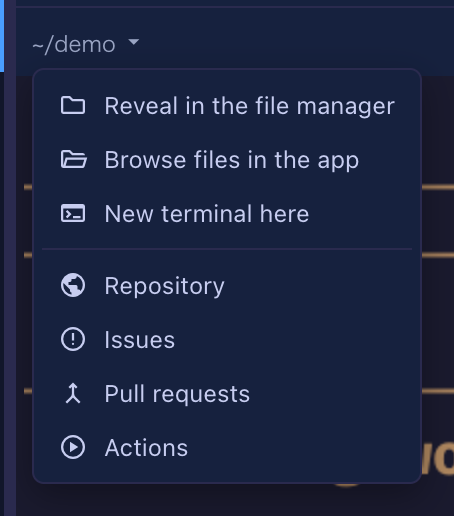
It appears only when the cell’s directory has a GitHub remote — on GitLab, or a GitHub Enterprise host we cannot name, the whole section stays away rather than offering a link that 404s.
The seventh row also made the menu taller than a tiled cell can show. A cell between 217 and 243 pixels high — which a 3x3 grid in an 800px window is — hid the bottom row. The menu is now sized against the cell and the window, and scrolls when neither is tall enough.
Reference: The path menu.
Fixed: a file you save keeps its own name
Saving a file served by the app used to produce raw.pdf, raw.png, raw.csv — the browser named the download after the last thing it saw in the URL, because the server never said what the file was called. It does now, and a PDF still previews in a tab rather than downloading.
Fixed: a failed deck save is on screen, not only in the console
A deck edit that the server refused used to leave no trace anyone would see: the editor keeps showing your edit either way — deliberately, so a transient failure does not eat keystrokes — which made a silent refusal look exactly like a success until the next reload put the old value back. The server’s own message now appears as a red banner under the tab row.
The same update makes the Canvas send the stories root its card names, so a deck card written by an earlier version, carrying a root that is not the workspace, now saves to the right file.
Reference: The Mulmo menu and the Canvas.
Fixed: a deck from the [Mulmo] menu could hide behind “Canvas is not enabled”
In a cell whose directory has no render MCP, picking a deck from the [Mulmo] menu opened the Canvas onto “Canvas is not enabled for this session” — the deck was already stored, and collapsing the cell and enlarging it again was the only way to see it. It shows straight away now.
See also
- Changelog — what changed and why
- Editing files beside a terminal — the Files pane, in the living guide
- The path menu — the header’s directory menu