9.4.0 — Confetti, from a key, a merge or Settings
A snapshot as of 9.4.0 (released 2026-10-08). It will go stale as the app moves on — that is expected, and the living reference is the guide each section links to.
New features
Confetti
A celebration over the whole page: party poppers from the bottom corners, fireworks, cherry petals, paper rain and balloons. One press is a show — it comes in waves for several seconds, and mixes three of the styles you allow, picked at random (#2929). Confetti arrived in 9.3.0 without a word about how to use it; this page is that word, and 9.4.0 adds the box in Settings. It never gets in the way: it takes no clicks, and if your system asks for reduced motion, there is none.
There are four ways to throw it:
- Try it now. Settings → Theme → Confetti → Try it.
- From the command palette. Open it (your
command-palettekey, or the toolbar’s Commands button), typeconfetti, pressEnter. -
From a key. Bind the
confettiaction in Settings → Keyboard shortcuts, or write it in the config:{ "keymap": { "confetti": "Cmd+Shift+u" } }Pick a combination your browser does not keep for itself; the shortcuts page warns about the ones that never fire. The key works on every screen, not only the terminal grid.
-
By itself, when something happens. Tick the events you want in Settings → Theme → Confetti. None are on until you say so, and the same event within a few seconds is one celebration:
Event When it fires A pull request you were watching is merged a cell was on the PR and saw it turn merged — not for a PR that was already merged when you opened the cell An agent finishes a turn every turn, so it is a lot; try it for an afternoon before leaving it on A Run command ends without an error exit code 0
There is one more, and it is in no menu: press up up down down left right left right b a while no terminal or text field has the focus, and every style is thrown at once.
More: Confetti, Keyboard shortcuts.
What looks different
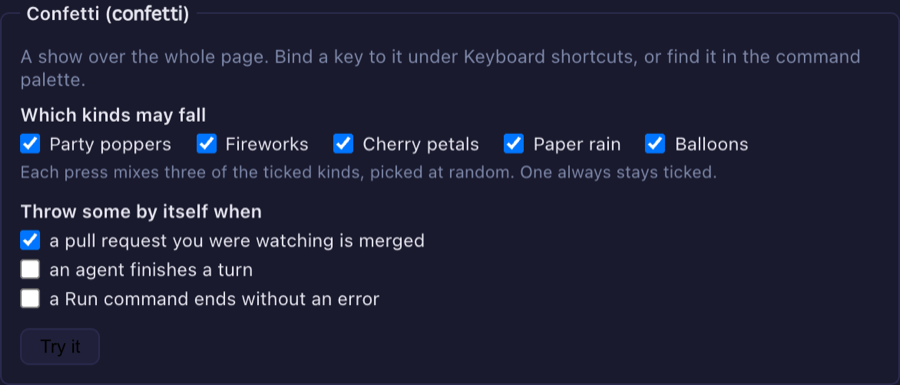
- Settings → Theme has a Confetti box, under the Playful effects tick (#2933):
- one tick for each style. At least one stays ticked — the last one is greyed out — because an empty list would be read as every style;
- one tick for each event that sets confetti off by itself;
- a Try it button.
Ticks save the moment you click them, with no restart. If the save is refused, the tick goes back.
Under the hood
- Nothing changes unless you tick something or bind a key; confetti is off for every event until you ask.
- A hand edit of
config.jsonneeds a server restart and a tab reload; the ticks do not. - The feature list now names the confetti action (#2931). Nothing needs doing.
How to tell you have it: Settings → Theme shows a Confetti box with a Try it button, and pressing it throws confetti over the page.