11.5.0 — The usage gauge works wherever you start
A snapshot as of 11.5.0 (released 2026-10-28). It will go stale as the app moves on — that is expected, and the living reference is the guide each section links to.
New features
The latest Codex verdict on a board card
On the experimental GitHub board (the toolbar’s GitHub mark, then Open the board (experimental)), a pull request whose thread holds a CODEX VERDICT: comment — the kind the codex-cross-review loop posts — now shows it on its card as Codex 2: LGTM or Codex 2: changes requested, the number counting the verdicts so far (#3197).
The chip is green or red only when the verdict names the push that is on the branch now — a verdict line reads CODEX VERDICT: LGTM (head <sha>), and that sha has to match. A verdict about an earlier push is drawn muted with for an older push beside it; one that names no push says push not named. Only verdicts by the repository’s owner, members and collaborators count, and a merged card shows no chip. The review round and the columns are as they were. Nothing to set up: open the board and look at an open pull request that has had a Codex round. More: GitHub.
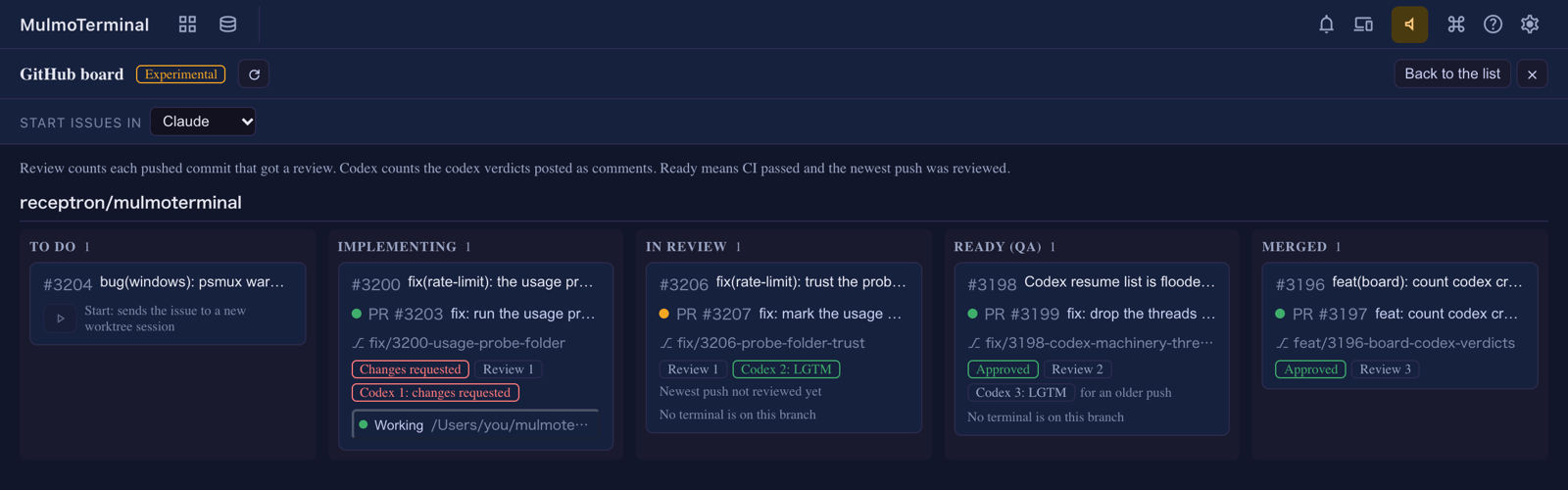
What looks different
- The Codex resume list no longer shows untitled “Guardian review” rows (#3199). Codex keeps the reviews it runs on its own tool calls, and its memory consolidation, as conversations of their own in the same folder, and the launcher’s “resume a codex conversation here” list showed them. It now lists only conversations a person started. How to tell: in a folder where you have used Codex, open the launcher and look at the resume list — the rows with no title are gone.
- On Windows with psmux 3.4.0, a new cell no longer opens with a config warning (#3205). The first line of every cell used to read
psmux: 1 config warning(s): … unknown option 'terminal-features'. That line was tmux’s way of forwarding clickable links, which psmux does without being told; it is now left out of psmux’s configuration. Restart the server once and open a new cell: the line is gone. -
The usage gauge’s hover text names a folder. When the Claude figures are missing because the check is waiting on Claude Code’s trust prompt, the text now says which folder to run
claudein (#3203). With 11.5.0 you should rarely see it at all — see Under the hood.
Under the hood
The Claude usage gauge works from any folder, home included
What was broken. The 5h / 7d Claude figures in the grid header come from a hidden claude session that asks one tiny question. It used to run in the workspace — the folder you started npx mulmoterminal in. Started in your home directory, that folder is the one Claude Code never saves trust for, so the hidden session stopped at the “Do you trust this folder?” dialog every time, the header showed claude usage n/a, and accepting the prompt as the hover text suggested changed nothing (#3200).
What changed. The check now runs in a folder of MulmoTerminal’s own, ~/.mulmoterminal/probe, wherever you started MulmoTerminal (#3203). And because nobody would ever run claude there by hand, MulmoTerminal records the trust answer for that folder itself, in Claude Code’s own settings for the login the check runs on — your usual login, and each second subscription — before the first check (#3207). The folder is empty and belongs to MulmoTerminal, so trusting it lets Claude Code read nothing it would not read anyway. The entry is written once; if Claude Code’s own save happens to overwrite it, the next check writes it again.
Nothing to do. How to tell you have the fix: start MulmoTerminal from your home directory, open the grid, and within a minute or two the Claude 5h / 7d figures appear in the header. If the header still says claude usage n/a and the hover text names the trust prompt, the answer could not be written — for a login that has never run claude, there is no settings file yet — so do once what the text says: run claude in ~/.mulmoterminal/probe (for a second subscription, start a cell on that account with ~/.mulmoterminal/probe as the Working directory) and accept the prompt. More: Configuration under usageGauge, and Second subscriptions.
Windows: a Codex installed with npm starts in a psmux cell
On Windows with psmux, a new Codex cell could end at once with psmux: can't find session: mulmoterminal__mt-… while a Claude cell on the same machine ran (#3202). The difference was how the two were installed: claude.exe is a program psmux can start, while an npm-installed codex is a .cmd script, which it cannot. MulmoTerminal now starts such a script through cmd.exe inside the psmux pane, the way it already did without psmux. Nothing to do: a Codex cell opens and stays open.