6.0.0 — Choose the agent and account an issue starts in
A snapshot as of 6.0.0 (released 2026-09-24). It will go stale as the app moves on — that is expected, and the living reference is the guide each section links to.
Nothing to configure. The new control is on as soon as you run 6.0.0; accounts appear in it only if you set up accounts (from 5.8.0).
Pick the agent an issue’s work starts in
Nothing to turn on.
The PRs & Issues view now has a START ISSUES IN row above the lists. Its choice decides what the play button on an issue row (Work on this issue) opens: Claude Code, Codex, or any other hosted agent. Until you pick, it follows your default agent. Your pick is remembered in this browser, separately from the chat launcher’s.
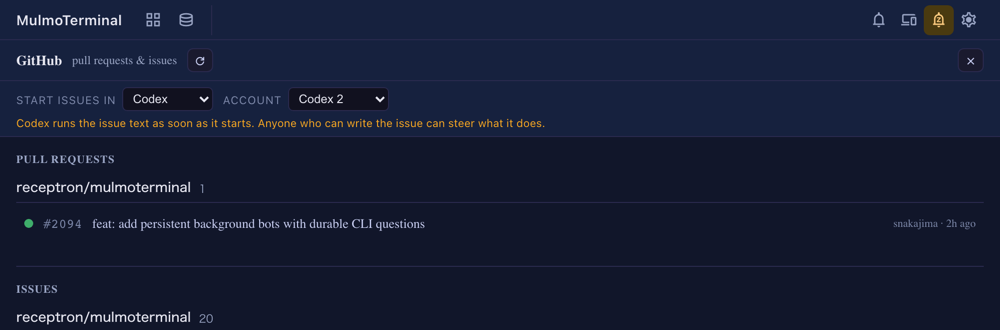
- Account. For Claude Code and Codex, an ACCOUNT select appears beside it when that agent has
accountsconfigured. Leave it on the default login, or pick a second subscription. Changing the agent resets the account. - The warning. With any agent but Claude picked, a sentence stays under the row. Claude only types the issue text into its input box, and you press Enter. The other agents run it as soon as they start, and all but Codex also approve their own tools. The issue text is whatever its author wrote.
- An agent you have not installed is listed but cannot be picked. If a remembered pick has since become unavailable, the row says why and links its install guide, and the play button refuses to open it.
- A worktree that already has a session resumes that session as it was, whatever the row says. The choice only applies to new sessions.
- Starting from the phone is unchanged: it uses the agent it is given, on the default login.
How to tell you have it: open the PRs & Issues view. The START ISSUES IN row is under the header whenever a configured repo has issues listed.
Living guide: GitHub — cross-repo PRs & Issues (section 3), and Configuration → accounts.