13.1.0 — The Library, and Restart keeps your conversation
A snapshot as of 13.1.0 (released 2026-11-20). It will go stale as the app moves on — that is expected, and the living reference is the guide each section links to.
Upgrade:
npx mulmoterminal@latest
Nothing to configure: everything below works as soon as you upgrade.
New features
The Library: every Claude conversation, searchable
Open More features → Library. It lists every Claude conversation on this machine, newest first, grouped into Today, This week and Earlier. Each row shows the title, then the project, the branch, the PRs it made and when.
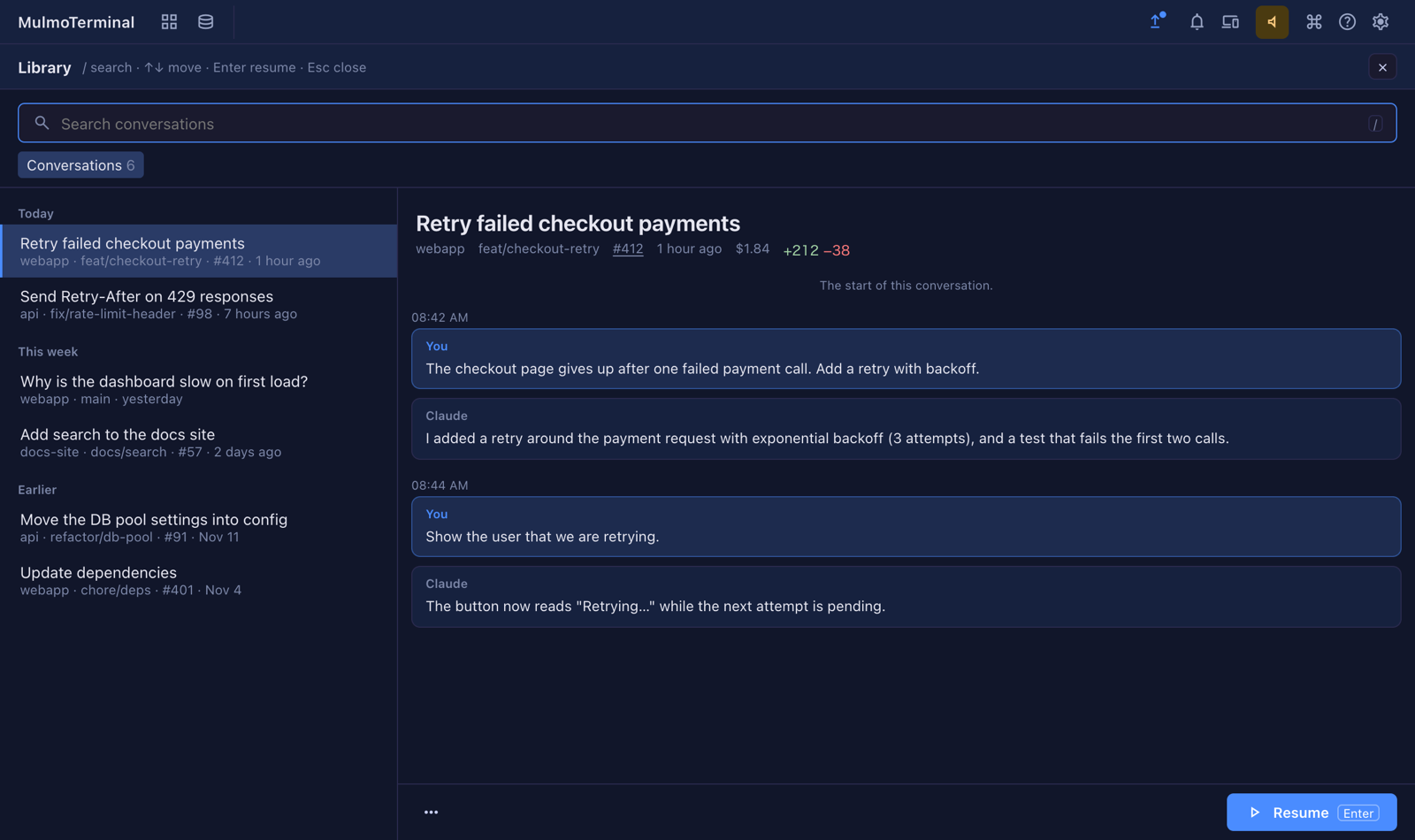
- Search: type in the box at the top (or press
/). It searches what you and Claude said, and the titles, and shows the matching lines under each result. - Read: click a conversation to read it on the right. The grey line under the title has the project, branch, PR numbers, cost and lines added and removed.
- Resume: press Resume (or
Enter) to open the conversation in a terminal, in the directory it ran in. A conversation already open in a cell is not opened twice; the Library says so instead. - Pin and rename: the ⋯ menu at the bottom pins a conversation to the top of the list, or gives it a name of your own. These are kept in
~/.mulmoterminal/library/marks.json; the conversation’s own file is never written.
Conversations started by claude -p or an SDK, and ones run in a temporary directory, are left out so the list holds the conversations you had. The first time you open the Library it builds its index in the background and shows its progress; after that it only reads what is new.
(#3337 design, #3338 index, #3341 the screen, #3344 pin and rename)
Open a cell’s conversation in the Library
A Claude cell’s History menu now ends with Open in Library. It opens the Library on that cell’s conversation, even an old one that is not on the first page of the list (#3345).
Go between a conversation and its PRs
In the GitHub view, a PR that one of your conversations made has a Library button beside it, which opens that conversation. The other way round, the PR numbers under a conversation’s title in the Library open the PR (#3346).
More: Feature reference — Library.
What looks different
- More features has a new Library entry, and a Claude cell’s History menu has Open in Library at the bottom (#3341, #3345).
- The GitHub view shows a Library button beside a PR that one of your conversations made (#3346).
- After an in-cell
/resume, the cell now shows the conversation you picked — its last prompt and reply in the header, its title, and its text in the conversation pane. Before, the cell went blank. Right after a/clearthe cell is still blank until you send something, since the new conversation is empty (#3349).
Under the hood
Restart continues the conversation you moved to
After a /clear, or after picking another conversation with /resume inside a cell, restarting the agent (the cell’s Tools menu → Restart the agent) used to bring back the conversation you had left. The same happened when a cell reopened after the machine restarted. It now continues the conversation you moved to, and the cell keeps its place (#3340, fixing #3325).
How to tell you have the fix: run /clear in a Claude cell, send one message, then choose Tools → Restart the agent. The cell comes back on the conversation you started after the /clear, not the one before it.
One version per home
Running two different versions of MulmoTerminal with the same home folder (for example an older npx mulmoterminal@… next to this one) is not supported: an older version undoes the fix above. To try another version alongside, start it with its own HOME (#3351; FAQ).
Windows: no more trust prompt for the drops folder
On Windows, Claude Code kept asking “Is this a directory you created or one you trust?” for MulmoTerminal’s drops folder on every Claude cell restart. The folder is now recorded the way Claude Code looks it up, so the question stops after you upgrade (#3323).
Dependencies
Minor and patch updates, including @mulmoclaude/core 7.2.1 and its plugins, @google/genai 3.6.1 and puppeteer 25.18.1. Nothing you need to do (#3326).