10.2.0 — Maths in the full-screen preview, ShapeScript and the editor beside the Canvas view
A snapshot as of 10.2.0 (released 2026-10-12). It will go stale as the app moves on — that is expected, and the living reference is the guide each section links to.
New features
Maths in the full-screen preview
The full-screen file view (/files) used to show $…$ and $$…$$ as code in a Markdown file’s Preview. It now draws them, in the app’s colours, inline and on their own line (#3021, #3017).
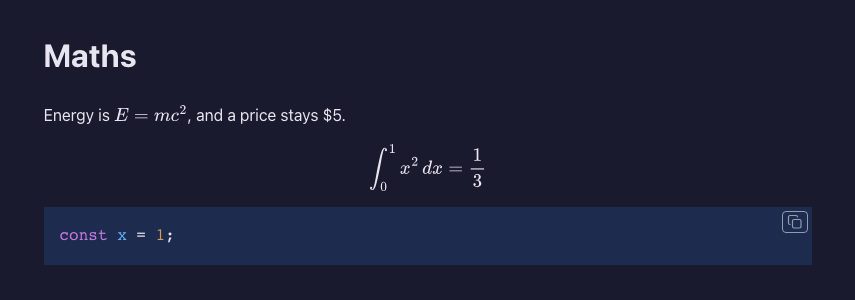
To try it: open a .md with a formula in the full-screen file view and press Preview. A price like $5 stays text, and so does anything inside code. The same file opened in a new tab shows the maths too.
Nothing to configure. More: Feature reference.
The editor beside the Canvas view
For a Markdown file, the side-by-side button (the split icon in the Files pane’s header) now puts the editor beside the Canvas view as well as beside Preview. The Canvas button decides which one is on the right (#3020, #3015).
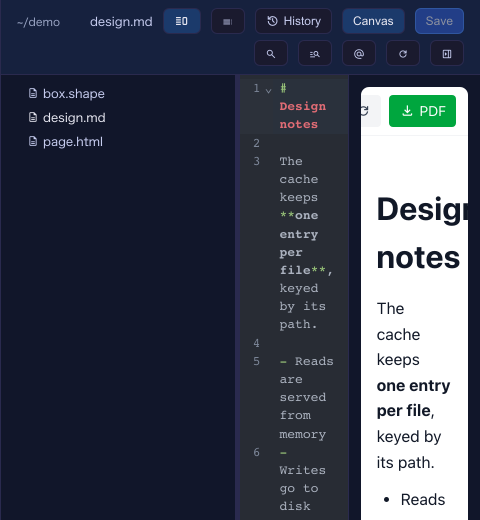
To try it: open a .md in the Files pane, press the split icon, then Canvas. Save in the editor (Cmd+S) and the right side redraws. Press the split icon again to keep only the Canvas view.
More: Feature reference.
ShapeScript files open in the Canvas view
.shape files join Markdown, HTML and MulmoScript: open one in the Files pane and press Canvas to see the 3D model beside the tree (#3019, #3016).
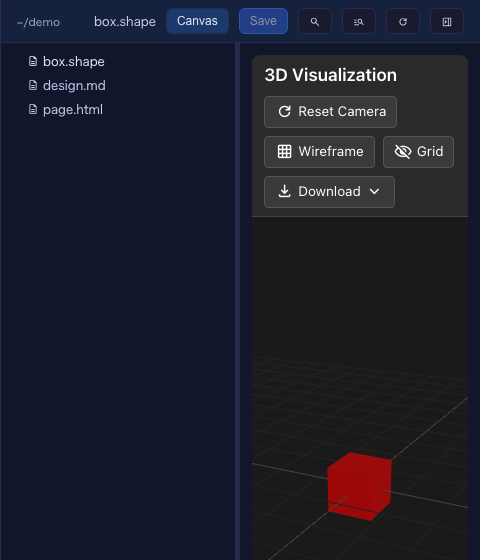
Nothing to configure.
What looks different
- In the Canvas view of a Markdown file, the split icon stays in the header (Edit/Preview steps aside), since it is how the editor comes back beside the view.
- Formulas in the full-screen preview are drawn rather than shown as
$…$.
Under the hood
- Maths is typeset on the server with MathJax, so the preview stays the script-free page it was. What reaches the page is filtered to the elements and attributes MathJax itself writes, so a formula cannot carry a link, a style or markup into the preview.
- Nothing needs doing.