5.8.0 — A second subscription per cell (beta), and agents you cannot start say so
A snapshot as of 5.8.0 (released 2026-09-24). It will go stale as the app moves on — that is expected, and the living reference is the guide each section links to.
One thing to configure, and only if you want it: accounts, which is beta. Everything else is on as soon as you run 5.8.0.
Cells on a second subscription (beta)
Configure it — only if you have more than one Claude Code or Codex subscription.
Beta. Automated tests cover it; it has not yet been used through a real day of work. If you configure nothing, nothing changes. If something looks wrong on an account cell, please report it.
Add an accounts list to ~/.mulmoterminal/config.json, then restart and reload the tab:
{
  "accounts": [
    { "id": "work", "label": "Work", "agent": "claude", "home": "~/.claude-work" }
  ]
}
An empty cell’s launch form then has an ACCOUNT select under the model. Pick the account and launch.
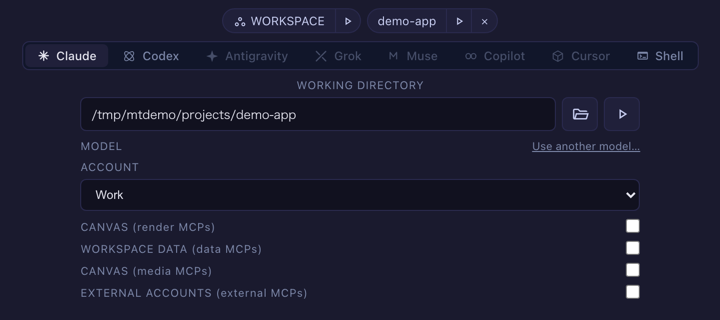
If the directory is new, run /login in that cell once. The cell’s header names the account, its sessions stay on it when resumed, and the toolbar shows its 5h / 7d usage beside your usual login’s.


A new Claude account’s usage check usually stops at Claude Code’s trust prompt first, and the toolbar says Work n/a. To clear it, start a cell on the account in the workspace and accept the prompt once.
How to tell you have it: Settings → Models and backends lists the account under Second subscriptions, and the launch form shows the ACCOUNT select for that agent.
Living guide: Several subscriptions side by side (the whole procedure) and Configuration → accounts (every key).
CLAUDE_CONFIG_DIR and CODEX_HOME are followed
Nothing to turn on.
If you start MulmoTerminal with CLAUDE_CONFIG_DIR set, the session list, resume, prompt history and the bundled skills used to look in ~/.claude anyway, so they came back empty. The Codex usage gauge was empty the same way whenever CODEX_HOME was set. Both are now read from where the agent actually writes.
How to tell you have the fix: with CLAUDE_CONFIG_DIR set, the resume list in a directory you have worked in shows its sessions.
An agent this machine cannot start is dimmed
Nothing to turn on.
In the new-cell Agent Picker, an agent whose command is not installed (or whose <AGENT>_BIN override points at nothing) is now dimmed. Picking it anyway shows why, and links the maker’s own install guide.
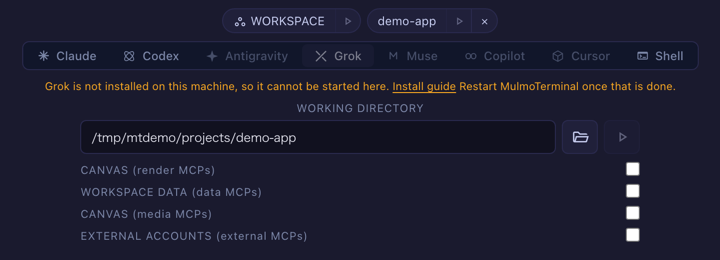
The same link is printed by the CLI when the default agent is missing. Installation is checked once at server start, so restart after installing one.
How to tell you have it: an agent you have not installed appears dimmed in the picker.
Living guide: Which coding agent.
A resumed issue session opens as its own agent
Nothing to turn on.
Starting work on an issue whose worktree already held a session resumed that session, but always as Claude. A Codex conversation there could be replaced by a new Claude session. It now opens as the agent it was started with.
How to tell you have the fix: start an issue, run a Codex session in its worktree, close the cell, and start the same issue again. The cell that opens is a Codex cell.