9.9.0 — Mermaid diagrams in the Files preview
A snapshot as of 9.9.0 (released 2026-10-10). It will go stale as the app moves on — that is expected, and the living reference is the guide each section links to.
New features
A mermaid fence is drawn as a diagram in Preview
Design notes, plans and READMEs that agents write often carry their diagrams as ` ```mermaid ` fences: flowcharts, sequence diagrams, state and class diagrams. Until now the Files pane’s Preview showed those as code, and you pasted them into another tool to see them. Now they are drawn in place (#2994, #2991).
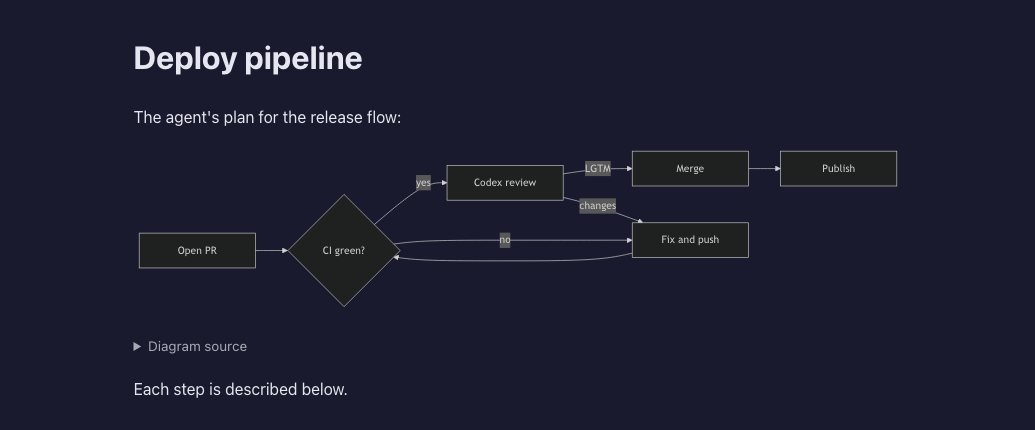
To try it:
- Open a Markdown file that has a ` ```mermaid ` fence in the Files pane — the Files button in a cell’s header, or the pane beside an enlarged cell.
- Press Preview. Each fence becomes a diagram; the side-by-side view draws them too.
- Under each diagram sits Diagram source. Open it to see the fence as a code block, with the same copy button every code block has. It is folded by default so a long document stays readable.
What to expect:
- The diagram follows the app’s theme: dark on a dark theme, light on a light one.
- A fence mermaid cannot parse shows the error in red where the diagram would be, with its code left open underneath so you can see which line it means. Nothing else on the page is affected.
- The first diagram takes a moment: mermaid is loaded from the app itself the first time it is needed, and only for a document that has a fence. Diagram types are loaded one by one, so a document with a flowchart does not download the parts for the others.
- Maths is still shown as code in Preview. Canvas in the pane’s header renders both, as before.
Nothing to configure. More: Feature reference.
What looks different
- A “Diagram source” line under each diagram in Preview, folded. Nothing else moves.
- A
.mdopened in a new browser tab (by clicking a path in a terminal) still shows a mermaid fence as code. That document runs no script at all, on purpose.
Under the hood
- Bracketed paste survives a reload. A program that turned bracketed paste on at startup lost it in the browser after a reload or reconnect, so a multi-line paste reached it line by line, as if Enter had been pressed after each. The mode is now read back from tmux with the others (#2992, #2990). Only the latest tmux is supported: this read needs tmux 3.7 or newer (3.8 as of this release), and an older tmux silently does nothing here. Check with
tmux -V; a distribution’s package is often older than the release. Nothing to configure. - How mermaid gets into the sandboxed Preview (#2994): the Preview’s security policy is unchanged. The app serves mermaid’s own files under
/api/files/mermaid/, and the Preview document imports them with the same one-time key its own script already carries. Nothing from your file is handed to that script.
More: Configuration, Feature list.
How to tell you have it: open a Markdown file with a ` ```mermaid ` fence in the Files pane and press Preview. A diagram appears, with a “Diagram source” line under it.